Computing and AI
Java Programming
English · 68 pp. PDF
Part I Java Basics
1 Data Types
1.1 Primitive Data Types
1.1.1 Primitive Data and Stack Memory
Primitive data types are the most basic types of data available in programming languages like Java. They are not objects and are directly stored in the Stack Memory.
| Type | Size | Default | Range | Example |
|---|---|---|---|---|
boolean |
1 bit | false |
true or false |
true |
char |
2 bytes | \u0000 |
0 to 65,535 (Unicode) |
’A’ |
byte |
1 byte | 0 |
-128 to 127 |
100 |
short |
2 bytes | 0 |
-32,768 to 32,767 |
1500 |
int |
4 bytes | 0 |
-2,147,483,648 to 2,147,483,647 |
100000 |
long |
8 bytes | 0L |
Approx. \(\pm 9.22 \times 10^{18}\) | 1000000000L |
float |
4 bytes | 0.0f |
Approx. \(\pm 3.40 \times 10^{38}\) | 3.14f |
double |
8 bytes | 0.0d |
Approx. \(\pm 1.80 \times 10^{308}\) | 3.1415926 |
The stack memory is fast and is automatically allocated and deallocated when the method or block scope ends. For example:
public void method() {
    int x = 10;  // Stored in stack memory
    double y = 20.5;  // Stored in stack memory
}
Here, both x and y are stored in the stack, and their memory is freed when method() exits.
1.1.2 Primitive Data Exceptions
While primitives declared inside a method or block are stored in the stack memory, primitives that are part of objects are stored in the heap memory. Why? Because the object itself resides in the heap memory.
class Example {
    int number;  // Stored in heap memory as part of the object
}

Example obj = new Example(); // `obj` is a reference stored in the stack,
// but the `number` field is part of the object stored in heap memory.
1.2 Reference Data Types
In Java, reference data types are used to store references (memory addresses) to objects. They differ significantly from primitive data types, which store values directly. A reference data type refers to objects or arrays and stores the memory address of the object it points to, rather than the actual data. It means that the reference (address) is stored in the stack and the object or array itself is stored in the heap.
Class Types: A class is a blueprint for creating objects. Reference types created from classes store references to these objects.
class Person {
    String name;
    int age;
}

Person person = new Person(); // 'person' is a reference in heap memory.
person.name = "John";
person.age = 30;
String: String is a commonly used reference data type in Java. It is immutable, meaning its value cannot be changed once created. Here, greeting is a reference to a String object stored in the heap.
String greeting = "Hello, World!";Array: Arrays in Java are also reference types. Even though they store primitive or reference values, the array itself is a reference to a memory location.
int[] numbers = {1, 2, 3, 4, 5};
// 'numbers' refers to an array object in the heap.
Interfaces: Reference types can also point to objects that implement a specific interface.
List<String> names = new ArrayList<>();
// 'names' refers to an object of ArrayList.
2 Variables
2.1 Key Characteristics of Variables
A variable is a location in memory used to store a data value. It has three components.
Type: Defines the kind of data (e.g.,
int,double,String) the variable can hold.Name: The identifier or label used to reference the variable.
Value: The actual data stored in the variable.
2.2 Variable Declaration and Initialization
Declaring a variable involves specifying its type and name. It instructs the compiler to allocate memory for the variable.
type variableName;
int a; // Declares an integer variable named 'a'
Initialization assigns a value to the variable. Variables can be initialized during declaration or later in the program.
type variableName = value;
int a = 10; // Declares and initializes 'a' with the value 10
Delayed Initialization:
int a; // Declaration
a = 20; // Initialization
2.3 Rules for Using Variables
A variable must be declared before it is used.
A variable must be initialized before its value is accessed.
Variable names should follow naming conventions:
Must start with a letter or underscore.
Cannot use reserved keywords.
Use camelCase for readability (
exampleVariable).
2.4 Types of Variables in Java
Local Variables: Declared within a method or block. Accessible only within that method or block. No default value (must be initialized explicitly).
Instance Variables: Declared in a class but outside any method or block. Belong to an instance of the class (each object gets its copy). Default values are assigned (0 for integers, null for objects, etc.).
Static Variables: Declared with the static keyword. Shared across all instances of the class. Have a single memory location.
Variable Scope: Scope refers to the part of the program where the variable is accessible.
Local variables: Limited to the method/block where they are declared.
Instance variables: Accessible within the class using the object reference.
Static variables: Accessible using the class name.
Example:
public class VariableExample {
    int instanceVariable = 30; // Instance variable

    static int staticVariable = 50; // Static variable

    public void methodExample() {
        int localVariable = 10; // Local variable
        System.out.println("Local: " + localVariable);
    }

    public static void main(String[] args) {
        VariableExample obj = new VariableExample();
        obj.methodExample();

        System.out.println("Instance: " + obj.instanceVariable);
        System.out.println("Static: " + staticVariable);
    }
}
In the example, we have an instance variable instanceVariable with a value of 30 and a static variable staticVariable with a value of 50. To access the instance variable, we need to create an object obj and use obj.instanceVariable to print its value.
For the static variable, we can access it directly using the class name (e.g., VariableExample.staticVariable) or through an object (e.g., obj.staticVariable). However, using the class name is recommended for clarity.
For the local variable localVariable, it is defined within the method methodExample. We call methodExample using the object obj to execute the method, and the local variable is printed inside the method. Local variables cannot be accessed outside their method.
3 Operations
3.1 Arithmetic Operations
Arithmetic operations are performed on numerical data types (int, float, double, etc.).
| Operator | Meaning |
|---|---|
+ |
Addition |
- |
Subtraction |
* |
Multiplication |
/ |
Division |
% |
Modulus (remainder) |
char Arithmetic: Arithmetic operations on char types are based on their ASCII values. For example, A + 1 results in the ASCII value of A (65) plus 1, producing 66.
String Concatenation: The + operator is used for concatenating strings. For example:
String greeting = "Hello" + " World!"; // Result: "Hello World!"3.2 Logical Operations
Logical operations are performed on boolean values (true or false).
| Operator | Meaning |
|---|---|
&& |
Logical AND |
|| |
Logical OR |
! |
Logical NOT |
> |
Greater than |
< |
Less than |
>= |
Greater than or equal to |
<= |
Less than or equal to |
== |
Equal to |
!= |
Not equal to |
These are primarily used for comparisons and boolean logic in conditional statements (e.g., if, while, for).
3.3 Assignment Operations
Assignment operators assign values to variables.
| Operator | Meaning |
|---|---|
= |
Assigns a value |
+= |
Adds to the current value and assigns |
-= |
Subtracts from the current value and assigns |
*= |
Multiplies the current value and assigns |
/= |
Divides the current value and assigns |
%= |
Computes the remainder and assigns |
Here is an example.
int x = 10;
x += 5; // Equivalent to: x = x + 5; Result: x = 15
3.4 Increment and Decrement Operations
| Operator | Meaning |
|---|---|
n++ |
Post-increment (use n first, then increase by 1) |
n-- |
Post-decrement (use n first, then decrease by 1) |
++n |
Pre-increment (increase n first, then use it) |
--n |
Pre-decrement (decrease n first, then use it) |
Here are some examples.
int i = 10;
int newNum = 10 * (i++); // newNum = 100, then i = 11
int j = 10;
int newNum1 = 10 * (++j); // j = 11, then newNum1 = 110
4 String
4.1 String Declaration and Initialization
In Java, Strings are a commonly used reference data type that represents a sequence of characters. Strings in Java are immutable, meaning once created, their value cannot be changed. For string declaration and initialization, there are two different methods.
Syntax 1: Using String Literals
String str = "hiiiiiiiii";Strings can be directly assigned using double quotes. When a string literal is used, it is stored in the String pool to save memory.
Syntax 2: Using the new Keyword
String str1 = new String("hi");This explicitly creates a new String object in the heap memory, bypassing the String pool. It is less common in practice because using literals is more memory-efficient.
4.2 Commonly Used String Methods
length(): Returns the length of the string, i.e., the number of characters in it. In this case, str.length() will return 10 because hiiiiiiiii has 10 characters.
int i = str.length();substring(): Extracts a portion of the string based on indices. There are two syntaxes for substring().
Syntax 1: str.substring(startIndex, endIndex) extracts characters from startIndex (inclusive) to endIndex (exclusive). For example, str.substring(1, 2) extracts the second character, i.
Syntax 2: str.substring(startIndex) extracts from startIndex to the end of the string. For example, str.substring(1) extracts iiiiiiiii.
str1 = str.substring(1, 2); // Syntax 1
str1 = str.substring(1); // Syntax 2indexOf(): Finds the first occurrence of the specified substring in the string. Returns the index of the first character of the substring, or -1 if it is not found. For example, str.indexOf("ii") returns 1 because the substring ii first appears starting at index 1.
int j = str.indexOf("ii");equals(): Compares the str and str1 for exact equality. Returns true if the strings are exactly the same (case-sensitive); otherwise, returns false. For example, if str = hiiiiiiiii and str1 = hi, str.equals(str1) will return false.
boolean k = str.equals(str1);compareTo(): Compare the order of occurrence of each character in the ASCII table of the calling string and the string enclosed in parentheses. Returns:
A positive integer if the calling string (
str) is lexicographically greater.A negative integer if the calling string is lexicographically smaller.
0if both strings are identical.
For example, if str = hiiiiiiiii and str1 = hi, str.compareTo(str1) will return a positive value because hiiiiiiiii is lexicographically greater than hi.
int h = str.compareTo(str1);4.3 Key Characteristics of Strings in Java
Immutable: Strings cannot be modified once created. Any operation that appears to modify a string actually creates a new string. For example, str.substring(1) does not modify str but creates a new string.
Stored in String Pool: Strings created using literals are stored in a special memory region called the String pool. This improves memory efficiency.
5 Array
5.1 One-Dimensional Arrays (1D Arrays)
Arrays in Java are a collection of elements of the same data type, stored in contiguous memory locations. Arrays are fixed in size once created and provide efficient access to elements through indexing. For 1D array declaration and initialization, there are two different methods.
Syntax 1: Declare and Initialize Separately
int[] arr1;        // Declare
arr1 = new int[5]; // Allocate memory for 5 integers
arr1[0] = 1;       // Initialize first element to 1
arr1[1] = 2;       // Initialize second element to 2
arr1[2] = 3;       // Initialize third element to 3
If elements are not explicitly initialized, they default to 0 for numeric types.
Syntax 2: Declare and Initialize Together
int[] arr2 = {1, 2, 3, 4, 5}; // Declare and initialize with valuesAccessing Elements: Array indices start at 0. Accessing an element outside the valid range (e.g., arr1[5]) throws an ArrayIndexOutOfBoundsException.
int i = arr1[0]; // Access the first element (index 0)Array Length: The length property gives the total number of elements in the array. For arr1, arr1.length returns 5.
int j = arr1.length;Fixed Size: Arrays in Java are fixed in size, meaning you cannot add or remove elements after creation. If you need a resizable array, consider using a List (e.g., ArrayList).
5.2 Two-Dimensional Arrays (2D Arrays)
2D arrays are essentially arrays of arrays, where each element is itself an array. For 2D array declaration and initialization, there are two different methods.
Syntax 1: Declare and Initialize Together
int[][] arr3 = {
    {1, 2, 3}, // First row
    {2, 3, 4}  // Second row
};
The above creates a 2D array with 2 rows and 3 columns.
Syntax 2: Declare First, Initialize Later
int[][] arr7 = new int[5][2]; // Allocate memory for a 5x2 array
arr7[0][0] = 1;              // Assign value to the first row, first column
arr7[1][1] = 2;              // Assign value to the second row, second column
Accessing Elements: Indices for rows and columns both start at 0. For example, arr3[0][1] accesses the second element of the first row (value = 2).
int k = arr3[0][0];
// Access the element at the first row, first column (value = 1)
5.3 Key Characteristics of Arrays in Java
Fixed Size: Arrays cannot be resized after creation.
Default Values:
Numeric types (e.g., int, double): 0
boolean: false
String and other objects: null
Length Property: Use .length to get the size of the array.
Multi-Dimensional Arrays: Java supports arrays of higher dimensions, such as 3D arrays, though they are less common.
Part II Control Flow and Recursion
6 If-Else Statements
6.1 Structure of If-Else Statements
The If-Else statement is a fundamental control structure in Java, used to execute different blocks of code based on conditions.
If Statement: Evaluates a Boolean expression. If the expression is true, the code block inside the if statement is executed. If the expression is false, the code block is skipped.
if (condition) {
    // Code block to execute if condition is true
}
If-Else Statement: Provides an alternative code block to execute when the condition is false.
if (condition) {
    // Code block to execute if condition is true
} else {
    // Code block to execute if condition is false
}
If-Else If Ladder: Evaluates multiple conditions sequentially. Once a true condition is found, its code block is executed, and the rest are skipped. If none of the conditions are true, the else block (if present) executes.
if (condition1) {
    // Code block for condition1
} else if (condition2) {
    // Code block for condition2
} else {
    // Default code block if no conditions are true
}
6.2 Example
Comparison of Two Numbers x and y.
if (x > y) {
    System.out.println("x is larger");
} else if (y > x) {
    System.out.println("y is larger");
} else {
    System.out.println("x and y are equal");
}
The output is
"x is larger"ifx > y."y is larger"ify > x."x and y are equal"if neither condition is true.
6.3 Key Points
Conditions: Conditions in If-Else statements must evaluate to a Boolean value (true or false).
Single Execution: Only one block of code is executed in an If-Else If ladder.
Default Block: The else block is optional but executes if no conditions are true.
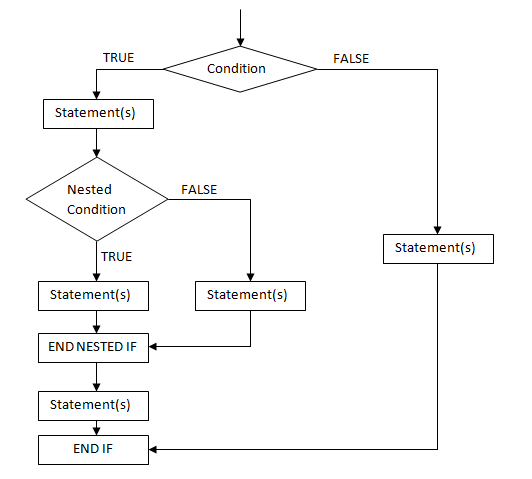
Nesting: If-Else statements can be nested for more complex logic.
6.4 Flowchart of Nested if Statement
7 For Loop
7.1 Structure of a For Loop
for (initialization; condition; increment/decrement) {
    // Body of the loop
}
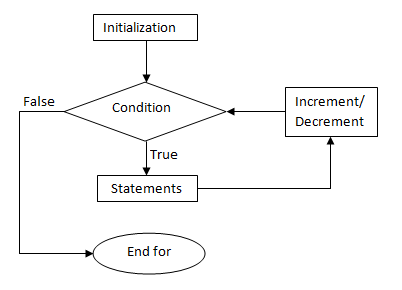
Initialization: This is executed once at the start of the loop. It typically initializes a loop control variable.
Condition: A Boolean expression that is checked before each iteration. If the condition evaluates to true, the loop body executes. If false, the loop terminates.
Increment/Decrement: This step is executed after the body of the loop. It updates the loop control variable.
7.2 Example of A For Loop
for (int i = 0; i < 10; i++) {
    System.out.println("i = " + i);
}
Initialization int i = 0: A loop control variable i is initialized to 0.
Condition i < 10: As long as i is less than 10, the loop will execute.
Body System.out.println("i = " + i);: The current value of i is printed to the console.
Increment i++: The value of i is increased by 1 after each iteration.
7.3 Execution Flow
The execution of a for loop follows these steps:
Initialization: The loop control variable is initialized (e.g.,
int i = 0).Condition Check: The condition is evaluated (e.g.,
i < 10). Iftrue, proceed to the body of the loop. Iffalse, exit the loop.Body Execution: The statements inside the loop body are executed.
Increment/Decrement: The loop control variable is updated.
Repeat: Steps 2–4 repeat until the condition evaluates to
false.
7.4 Characteristics of For Loops
Fixed Iterations: Ideal when the number of iterations is known beforehand. For example, Loop through numbers 0-9.
Compact Syntax: Combines initialization, condition, and increment in one line for clarity.
Nested Loops: A for loop can be placed inside another for loop for multi-dimensional iterations (e.g., iterating over a 2D array).
7.5 Practical Usage
Iterating Through Arrays: Iterates through each element of the array arr.
int[] arr = {1, 2, 3, 4, 5};
for (int i = 0; i < arr.length; i++) {
    System.out.println(arr[i]);
}
Counting Backward: Prints numbers from 10 to 1.
for (int i = 10; i > 0; i--) {
    System.out.println(i);
}
Nested Loops: Iterates over all combinations of i and j values in a 3x3 grid.
for (int i = 0; i < 3; i++) {
    for (int j = 0; j < 3; j++) {
        System.out.println("i = " + i + ", j = " + j);
    }
}
8 While Loop
8.1 Structure of a While Loop
A while loop in programming is a control flow statement that allows a block of code to be executed repeatedly based on a given Boolean condition. The execution continues until the condition evaluates to false.
int i = 0;
while(i < 10){
    i++;
}
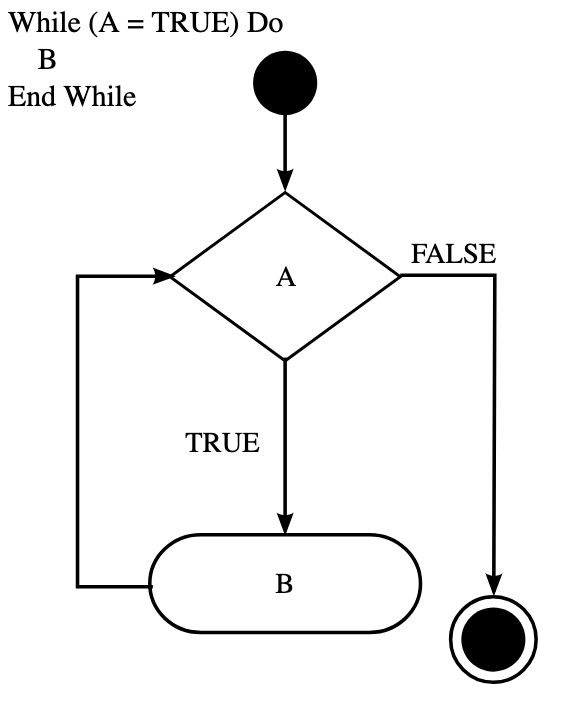
The loop starts by evaluating the condition (i < 10). If the condition is true, the statements inside the loop execute. The loop then re-evaluates the condition. Once the condition becomes false, the loop terminates.
8.2 Breakdown of While Loop Execution
Condition Evaluation: The loop checks whether the condition (i < 10) is true or false. If true, execution enters the loop body. If false, execution skips the loop and continues with the rest of the program.
Loop Body Execution: The code inside the while block runs (e.g., i++ in the example). The increment step ensures i increases each iteration.
Rechecking Condition: After executing the body, the condition is checked again. If still true, another iteration begins. If false, the loop terminates.
8.3 Flowchart Representation
8.4 Key Characteristics of While Loops
Pre-check loop: The condition is evaluated before executing the loop body.
Infinite loop risk: If the condition never becomes false, the loop runs indefinitely.
Used when the number of iterations is unknown: Unlike a for loop, while loops are ideal when we do not know in advance how many times the loop should run.
For loop and while loop: All for loops can be rewritten as while loops, because both loops serve the same fundamental purpose — executing a block of code repeatedly based on a condition.
9 Do-While Loops
9.1 Structure of a Do-While Loop
do {
    // Code block (executed at least once)
} while (condition);
The do-while loop is a type of loop in Java that ensures the loop body executes at least once, regardless of the condition. A do-while loop consists of two parts:
Body: Executes at least once.
Condition: Checked after the body execution. If
true, the loop runs again; iffalse, the loop stops.
The body inside { } executes at least once. After execution, the condition inside while(condition); is checked. If true, the loop runs again; if false, the loop stops.
9.2 Key Differences from While Loop
| Feature | While Loop | Do-While Loop |
|---|---|---|
| Execution Before Condition Check | No | Yes |
| Executes at Least Once? | No | Yes |
| Condition Check Location | Before loop body | After loop body |
When the loop must run at least once (e.g., menu selection, user input validation). Example: Asking users for input at least once, then checking if they want to continue.
Scanner scanner = new Scanner(System.in);
int number;
do {
    System.out.println("Enter a number (0 to stop): ");
    number = scanner.nextInt();
} while (number != 0);
10 Which Loop?
10.1 Comparison of For Loop, While Loop, and Do While Loop
10.2 General Rules
for loop: known number of repetitions.
while loop: unknown number of repetitions.
do-while loop: loop body should be executed before condition check.
11 Recursion
Recursion is a fundamental concept in Java where a method calls itself to solve a problem. This approach is commonly used for problems that can be divided into smaller subproblems of the same type. A recursive function typically consists of two main parts:
Base Case: The condition under which the recursion stops.
Recursive Case: The function calls itself with a smaller input to approach the base case.
11.1 Example: Factorial Calculation
A classic example of recursion is the computation of factorial, defined as: \[n! = \begin{cases} 1, & \text{if } n = 0 \\ n \times (n-1)!, & \text{if } n > 0 \end{cases}\] The following Java code demonstrates recursion for computing factorial:
public class FactorialExample {
    public static int factorial(int n) {
        if (n == 0) {
            return 1; // Base case
        }
        return n * factorial(n - 1); // Recursive case
    }

    public static void main(String[] args) {
        System.out.println("Factorial of 5: " + factorial(5));
    }
}
11.2 Example: Fibonacci Sequence
The Fibonacci sequence is another classic example: \[F(n) = \begin{cases} 0, & \text{if } n = 0 \\ 1, & \text{if } n = 1 \\ F(n-1) + F(n-2), & \text{if } n > 1 \end{cases}\] The Java implementation is as follows:
public class FibonacciExample {
    public static int fibonacci(int n) {
        if (n == 0) {
            return 0; // Base case
        }
        if (n == 1) {
            return 1; // Base case
        }
        return fibonacci(n - 1) + fibonacci(n - 2); // Recursive case
    }

    public static void main(String[] args) {
        System.out.println("Fibonacci of 6: " + fibonacci(6));
    }
}
11.3 Advantages and Disadvantages of Recursion
Advantages
Makes code more readable for problems that have a natural recursive structure (e.g., tree traversal, backtracking).
Reduces the need for explicit loops.
Disadvantages
Can lead to high memory usage due to deep recursion (stack overflow).
Performance can be worse than iteration if subproblems are recomputed multiple times.
Part III Object-Oriented Programming
12 Classes & Objects
12.1 Object-Oriented Programming
Object-Oriented Programming is a programming paradigm based on the concept of "objects." An object is a single container that combines both data (attributes) and behavior (methods or operations). The Four Pillars of OOP:
Abstraction: Hiding complex implementation details while exposing only the essential features to the user.
Inheritance: Creating new classes based on existing ones, promoting code reuse and hierarchical relationships.
Polymorphism: Allowing different classes to be treated as instances of the same interface, enabling flexible and extensible code design.
Encapsulation: Bundling data and methods together while restricting direct access to the internal state of objects.
12.2 Class, Instance Variables and Object
12.2.1 Class
A class is a blueprint or template for creating objects. It defines the structure and behavior that objects of that type will have. A class includes:
Instance Variables: Attributes (data) that each object will possess.
Methods: Functions that define the object’s behavior.
12.2.2 Instance Variables
Instance variables are attributes defined in a class that hold the data for each object. They are declared inside the class but outside any method. Each object created from the class has its own copy of the instance variables. They are usually private to enforce encapsulation. Example from the Car class:
private String brand;
private int speed;
Constructors are used to initialize instance variables when an object is created. They are special methods in a class that are automatically called when a new object is instantiated. Key Characteristics of Constructors:
Same Name as the Class: The constructor must have the same name as the class.
No Return Type: Constructors do not have a return type, not even
void.Automatic Invocation: When you use the
newkeyword to create an object, the constructor is automatically called.Can Be Overloaded: You can have multiple constructors with different parameters (constructor overloading).
public class Car {
    private String brand;  // Instance variable
    private int speed;     // Instance variable

    // Constructor to initialize instance variables
    public Car(String brand, int speed) {
        this.brand = brand;
        this.speed = speed;
        // 'this' refers to the current object's instance variable
    }

    // Method to display information
    public void displayInfo() {
        System.out.println("Brand: " + brand + ", Speed: " + speed + " km/h");
    }
}
Default Constructors: Do not take any parameters. May or may not choose to give specific initial values to instance variables.
public Car(){

}
Alternate Constructors: Take parameters and use them to initialize instance variables.
public Car(String brand, int speed) {
    this.brand = brand;
    this.speed = speed;
    // 'this' refers to the current object's instance variable
}
12.2.3 Object
An object is an instance of a class. It represents a real-world entity with specific values for its instance variables and the ability to perform defined behaviors (methods). Objects are created using the new keyword followed by a class constructor.
We use the following method to create and use objects.
Car car1 = new Car("Toyota", 120);car1 is a reference variable. The new operator returns a reference to the newly created instance. Reference variables (in this case car1) store the reference (location/ memory address) of an object.
Here, car1 and car2 are objects of the Car class. They share the same structure (defined by the class) but hold different data values.
public class Main {
    public static void main(String[] args) {
        // Creating objects from the Car class
        Car car1 = new Car("Toyota", 120);
        Car car2 = new Car("Honda", 100);

        // Accessing object methods
        car1.displayInfo();
        car2.displayInfo();
    }
}
Brand: Toyota, Speed: 120 km/h
Brand: Honda, Speed: 100 km/h12.3 Overloading Methods
Method Overloading is a feature in object-oriented programming where multiple methods can have the same name but differ in their parameter lists. It allows a class to have more than one method with the same name but different functionality based on input parameters.
public class Calculator {
    // Method 1: No parameters
    public int add() {
        return 0;  // Default value
    }

    // Method 2: One parameter
    public int add(int a) {
        return a;
    }

    // Method 3: Two parameters
    public int add(int a, int b) {
        return a + b;
    }

    // Method 4: Different parameter types
    public double add(double a, double b) {
        return a + b;
    }
}
13 Pass By Value
Java creates a copy of the variable being passed in the method.
Primitives – only the value is passed.
Objects – a copy of the reference is created and passed into the method, but points to the same memory reference.
13.1 Primitive Types
In Java, primitive types include int, double, float, char, boolean, byte, short, and long. When these types are passed as arguments to methods, Java follows the Pass By Value mechanism. This means that the method receives a copy of the value, not the original variable itself.
public class PassByValueExample {
    public static void main(String[] args) {
        int original = 10;
        modifyPrimitive(original);
        System.out.println("Original value after method call: " + original);
        // Output: 10
    }

    public static void modifyPrimitive(int x) {
        x += 5;
        // This only modifies the local copy of x, not the original variable
        System.out.println("Value inside method: " + x);
        // Output: 15
    }
}
Since Java only passes a copy of the value, the method works on a separate memory location. When the method completes, the local copy is discarded, and the original variable remains untouched.
13.2 String Example
In Java, String objects are designed to be immutable, which means that once created, the contents of the string cannot be changed. Every time any modification is made to the string (such as concatenation, replacement, truncation), a new String object is generated, and the original object remains unchanged.
Example 1: Try to modify the string directly (modification fails).
public class StringExample {
    public static void modifyString(String str) {
        str = "New String";  // Reassign to a new string
    }

    public static void main(String[] args) {
        String text = "Original";
        modifyString(text);
        System.out.println(text);  // Output: Original (unchanged)
    }
}
Example 2: Modify by return value (modification successful).
public class StringExample {
    public static String modifyString(String str) {
        str = "New String";  // Create a new string and return it
        return str;
    }

    public static void main(String[] args) {
        String text = "Original";
        text = modifyString(text);  // Reassign the return value
        System.out.println(text);  // Output: New String
    }
}
Example 3: Concatenate strings (modification fails).
public class StringExample {
    public static void appendString(String str) {
        str += " World";  // Equivalent to str = str + " World"
    }

    public static void main(String[] args) {
        String text = "Hello";
        appendString(text);
        System.out.println(text);  // Output: Hello (unchanged)
    }
}
13.3 Object Types
If the new keyword is used to create a new object within a method, it means that memory has been reallocated, causing the method’s internal reference to point to the new object. Since Java passes a copy of the reference, the original reference remains unaffected.
However, if new is not used and the internal properties of the object are modified instead, the original object can be changed because the reference inside the method still points to the memory address of the original object.
Example 1: Without new keyword
public static void modifyObject(ClassA obj) {
    obj.setA(3.5);  // Modifying the properties of an object
}

public static void main(String[] args) {
    ClassA x3 = new ClassA();
    x3.setA(8.8);
    modifyObject(x3);
    System.out.println(x3.getA());  // Output: 3.5
}
Example 2: With new keyword
public static void newObject(ClassA obj) {
    obj = new ClassA();  // New object
    obj.setA(3.5);
}

public static void main(String[] args) {
    ClassA x3 = new ClassA();
    x3.setA(8.8);
    newObject(x3);
    System.out.println(x3.getA());  // Output: 8.8
}
Key point: If there is new, it will not change; if there is no new, it will change.
14 Inheritance
14.1 The Concept of Inheritance
Inheritance allows one class (subclass) to inherit fields and methods from another class (superclass). It represents an "is-a" relationship, where the subclass is a more specific version of the superclass.
Superclass (Parent Class): The general class with common properties and behaviors.
Subclass (Child Class): The more specific class that inherits from the superclass.
What Subclasses Can Do:
Inherit: All non-private fields and methods from the superclass.
Add New Fields: Define additional attributes specific to the subclass.
Add New Methods: Introduce new behaviors unique to the subclass.
Override Methods: Redefine inherited methods to provide specific behavior.
Important Notes:
Private members are not inherited. Only
public,protected, and default (package-private) members are accessible in the subclass.Constructors are not inherited, but the subclass can call the superclass constructor using
super().Java supports single inheritance: A class can extend only one superclass, but interfaces can provide multiple inheritance-like behavior.
14.2 What Happens When A Child Object Is Instantiated?
When a child object is created, the constructor of the parent class (superclass) is called first. This happens either explicitly using super() in the child constructor or implicitly if no super() is specified. If the parent has a default constructor, it will be called automatically.
After the parent constructor completes execution, the child class constructor is called. This ensures that the parent part of the object is properly initialized before the child-specific attributes and behaviors are set up.
Superclass instance variables: These are initialized when the parent’s constructor is called.
Subclass instance variables: These are initialized when the child’s constructor is executed.
// Superclass (Parent)
class Animal {
    String type;

    public Animal() {
        System.out.println("Parent Constructor: Animal created.");
        this.type = "Unknown";
    }
}

// Subclass (Child)
class Dog extends Animal {
    String breed;

    public Dog(String breed) {
        super();  // Implicit if not written
        System.out.println("Child Constructor: Dog created.");
        this.breed = breed;
    }
}

// Main class to test
public class Main {
    public static void main(String[] args) {
        Dog myDog = new Dog("Golden Retriever");
    }
}
14.3 Object Class
In Java, the Object class is the ultimate superclass of all classes. If a class does not explicitly extend another class, it implicitly extends the Object class.
public class Example {
    // This class implicitly extends Object
}
Every Java class (including Array and String) inherits the Object class by default, even if you don’t explicitly use extends Object.
String is a subclass of Object.
String is a special class in Java that is specifically used to process text. It inherits the Object class. All String objects are instances of Object.
public class Main {
    public static void main(String[] args) {
        String str = "Hello, World!";
        System.out.println(str instanceof Object);  // Output: true
    }
}
In Java, "Hello, World!" in String str = "Hello, World!"; is an object of the String class.
Array is also a subclass of Object.
In Java, arrays are also a special type of object. Whether it is an array of a basic type (such as int[]) or a reference type (such as String[]), they all inherit from Object.
public class Main {
    public static void main(String[] args) {
        int[] numbers = {1, 2, 3};
        System.out.println(numbers instanceof Object);  // Output: true
    }
}
14.4 Overriding Methods
Method Overriding is a subclass can modify the implementation of a method defined in the superclass.
Same exact signature (method name and parameter types) as a method in the superclass.
Consider using
@Overrideannotation (compiler checking).
A private method cannot be overridden because it is not accessible outside its own class.
| Overloading | Overriding |
|---|---|
| Same method name with different parameters | Same exact signature |
| Usually within the same class | Only done by a subclass |
| Useful for processing different objects by similar logic | Useful for incorporating additional information into the methods supported by the basic functionality of the superclass |
14.5 Useful Method in the Object Class
The Object class provides several useful methods that are commonly overridden by subclasses. The most important one is toString().
Converts the object into a human-readable String representation. Default behavior is returning the class name followed by the object’s hash code. Recommended to override to provide meaningful output.
public class Person {
    String name;
    int age;

    public Person(String name, int age) {
        this.name = name;
        this.age = age;
    }

    @Override
    public String toString() {
        return "Person{name='" + name + "', age=" + age + "}";
    }
}

public class Main {
    public static void main(String[] args) {
        Person p = new Person("Alice", 25);
        System.out.println(p);  // Output: Person{name='Alice', age=25}
    }
}
14.6 Important Keywords
extends indicates that one class (the subclass) inherits from another class.
public class ChildClass extends ParentClasssuper refers to the superclass.
Call a superclass constructor:
super(x,y);Call a superclass method:
super.foo();Access a superclass public or protected data field:
super.name;
static
static variables
Used for a common property of all objects – not unique for each instance.
Gets memory once at the time of class loading – saves memory!
static methods
Belongs to the class.
Can be invoked without creating an instance of a class.
Can access static data and change the value of it.
static blocks
Initialize static data member(s)
Executes before main method
final
final variables
Initialized as a part of declaration but never can get a new value.
Primitives are constant.
Object types always refer to same object (though that object could change internal state).
A final field of a class will almost always be static (wasteful to have every instance store an identical value).
final methods
Cannot be overridden by a subclass
final classes
Cannot be subclassed.
this
The this keyword refers to the current instance of a class. It is mainly used inside instance methods and constructors.
Usage 1: Passing the current object as an argument to another method: this can be used to pass the current object to another method.
public class Example {
    void display(Example obj) {
        System.out.println("Method called with object reference");
    }

    void callMethod() {
        display(this);  // Passing the current object
    }

    public static void main(String[] args) {
        Example ex = new Example();
        ex.callMethod();
    }
}
Usage 2: Distinguishing between instance variables and local variables: If a method parameter has the same name as an instance variable, this helps differentiate them.
public class Counter {
    int count;

    public Counter(int count) {
        this.count = count;
        // `this.count` refers to the instance variable
    }
}
Usage 3: Calling one constructor from another constructor: The this() keyword can be used to call another constructor within the same class, helping to avoid code duplication.
public class Counter {
    int count;

    public Counter(int count) {
        this.count = count;
    }

    public Counter() {
        this(0);
        // Calls the one-parameter constructor with a default value of 0
    }
}
15 Encapsulation
Protective barrier that prevents code and data being randomly controlled outside your class. Encapsulation make fields private & provide access via public methods and gives maintainability, flexibility, and extensibility to code.
| Modifier | Class | Package | Subclass | World |
|---|---|---|---|---|
| public | Y | Y | Y | Y |
| protected | Y | Y | Y | N |
| no modifier | Y | Y | N | N |
| private | Y | N | N | N |
16 Polymorphism
BankAccount x = new SavingsAccount();SavingsAccount is a subclass of BankAccount. A subclass inherits from a superclass, meaning a SavingsAccount is a BankAccount, but a BankAccount is not necessarily a SavingsAccount.
Polymorphism: A superclass reference (BankAccount x) can point to an instance of its subclass (new SavingsAccount()). This is known as polymorphism—a superclass reference can refer to any subclass object. In the BankAccount x = new SavingsAccount();, x is called a polymorphic variable and x references a CheckingAccount object.
SavingsAccount x = new BankAccount();
// NOT Allowed
A subclass reference (SavingsAccount x) cannot point to an instance of its superclass (new BankAccount()), since a BankAccount object does not necessarily have the extra functionality that SavingsAccount provides.
16.1 Liskov Substitution Principle
If class A is a subclass of class B, then A can be used wherever B is expected, without affecting the correctness of the program.
If A is a B, then an instance of A can be assigned to a reference of B.
But B is not necessarily an A, so an instance of B cannot be assigned to a reference of A.
A superclass reference can refer to any subclass object.
Superclass x = new Subclass();is valid.
16.2 instanceof Operator in Java
instanceof is an operator that tests at runtime if an object is an instance of a specific class or its subclass.
x instanceof ClassNameReturns true if
xis an instance ofClassNameor any subclass ofClassName.Returns false if
xis not an instance ofClassName.
BankAccount x = new BankAccount();
boolean b = x instanceof BankAccount;  // true
b = x instanceof CheckingAccount;      // false
x is a BankAccount, so x instanceof BankAccount returns true. x is not a CheckingAccount, so x instanceof CheckingAccount returns false.
BankAccount x = new CheckingAccount();
b = x instanceof BankAccount;   // true
b = x instanceof CheckingAccount; // true
CheckingAccount is a subclass of BankAccount. Since x is created as a CheckingAccount, it is also a BankAccount (inherits from it). Both conditions return true.
16.3 Polymorphism, Casting and Dynamic Dispatch
BankAccount x = new CheckingAccount();xcan call methods declared in the BankAccount (superclass) definition.Dynamic Dispatch: For override methods in the
CheckingAccountclass for theBankAccountclass,xwill call theCheckingAccount(override) version of the methods.We can not access the new methods that declared in the CheckingAccount (subclass) definition. But we can use Narrowing Conversion to access.
Widening Conversion/Upcasting
Converting a subclass (T) into a superclass (U). It is safe and automatic – no explicit cast is required. It will be checked by the compiler – ensures type correctness.
BankAccount x = new CheckingAccount(); // Valid (Upcasting)SavingsAccount is a BankAccount, so we can store a SavingsAccount object in a BankAccount variable.
Narrowing Conversion/Downcasting
Converting a superclass (T) into a subclass (S). It requires an explicit cast because the compiler cannot guarantee correctness. It will not be checked by the compiler – may cause runtime errors (ClassCastException).
if (x instanceof SavingsAccount) {
    SavingsAccount save = (SavingsAccount) x;  // Safe downcasting
} else {
    System.out.println("x is not a SavingsAccount");
}
If x was not actually a SavingsAccount (e.g., it was just a BankAccount), the program would throw a ClassCastException at runtime. The safer approach is using instanceof Before Downcasting.
After downcasting, x can access the newly added methods of SavingsAccount and still access the methods of BankAccount. For the methods overridden by SavingsAccount, we still use the SavingsAccount version.
// Superclass: BankAccount
class BankAccount {
    public void deposit() {
        System.out.println("Depositing money into a BankAccount");
    }

    public void withdraw() {
        System.out.println("Withdrawing money from a BankAccount");
    }
}

// Subclass: SavingsAccount
class SavingsAccount extends BankAccount {
    @Override
    public void withdraw() {
        System.out.println("Withdrawing money from a SavingsAccount with
        interest calculation");
    }

    public void addInterest() {
        System.out.println("Adding interest to SavingsAccount");
    }
}

public class Main {
    public static void main(String[] args) {
        // Upcasting
        BankAccount x = new SavingsAccount();

        // Can only access methods in BankAccount (including methods
        // overridden by SavingsAccount)
        x.deposit();    // Output: Depositing money into a BankAccount
        x.withdraw();   // Output: Withdrawing money from a SavingsAccount
                        // with interest calculation

        x.addInterest();
        // Compile error! BankAccount does not have an addInterest method.

        // Downcasting
        if (x instanceof SavingsAccount) {
            SavingsAccount save = (SavingsAccount) x;
            save.addInterest();   // Output: Adding interest to SavingsAccount
            save.withdraw();      // Output: Withdrawing money from a
                                  // SavingsAccount
            save.deposit();       // Output: Depositing money into a
                                  // BankAccount
        }
    }
}
17 Abstraction
17.1 Definition of Abstraction
Abstraction hides implementation details and exposes only necessary functions. In this way, users do not need to know the underlying implementation, but only need to know how to use it. "Abstracting away details" makes the program more modular and easier to maintain. What if we want to define a structure without defining the implementation?
Abstract Methods & Classes
Interfaces
17.2 Abstract Methods
In Java you can declare a method without defining it:
public abstract double getArea();An abstract method is a method without an implementation and must be overridden by subclasses.
Method header ends with a semicolon.
Must be implemented by a subclass in order to be used.
Can be called by concrete methods in the class.
17.3 Abstract Classes
Must be declared with the keyword abstract:
abstract class MyClass{…}An abstract class is a class that cannot be instantiated directly. It mainly serves as a base class, allowing subclasses to implement its methods.
A class must be abstract if it has at least one abstract method.
It is not necessary to have abstract methods in an abstract class.
You can extend an abstract class.
An abstract class can have both abstract and concrete methods.
An abstract class can have final methods.
An abstract class can have constructors.
An abstract class can have static methods.
abstract class Shape {
    // Abstract method with no implementation.
    public abstract double getArea();

    // Concrete methods that call abstract methods.
    public void printArea() {
        System.out.println("The area is: " + getArea());
    }
}

class Circle extends Shape {
    private double radius;

    public Circle(double radius) {
        this.radius = radius;
    }

    // Subclasses must implement the abstract method.
    @Override
    public double getArea() {
        return Math.PI * radius * radius;
    }
}

public class Main {
    public static void main(String[] args) {
        Shape myShape = new Circle(5);
        myShape.printArea();
    }
}
17.4 Some Facts about Abstract Classes and Methods
There are some facts about abstract classes and methods.
An abstract class can have final methods and concrete method.
Abstract methods cannot be final.
Abstract classes cannot be final.
Final classes cannot contain abstract methods.
A class must be an abstract class if it has at least one abstract method in it. However, an abstract class does not necessarily need to have an abstract method in it.
17.5 Interface
interface MyInterface {
    void method1();
    void method2();
}
An interface is 100% abstract, that is, it does not contain the specific implementation of a method, but only defines the declaration of the method (with no data and no bodies). An interface is a template for another class to follow.
Methods in an interface have no method body. Methods declared in an interface are implicitly both public and abstract.
Interface cannot contain instance variables. All variables in an interface must be public static final (i.e. constants).
Interface have no constructors.
Interfaces can only be implemented by classes. Implementing an interface means the class must define all of the methods in the interface unless it is an abstract class.
class MyClass implements MyInterface {
    public void method1() {  // Methods must be implemented.
        System.out.println("Method1 implemented");
    }

    public void method2() {  // Methods must be implemented.
        System.out.println("Method2 implemented");
    }
}
Abstract Classes Implement Interfaces.
If an abstract class implements an interface, it may not implement all methods, but in this case, it itself is still abstract and requires its subclasses to implement the remaining methods.
interface Animal {
    void makeSound();  // Methods that must be implemented.
}

// Correct: AnimalAbstract inherits the interface but does not implement
// makeSound(), so it must be abstract.
abstract class AnimalAbstract implements Animal {
}

// The concrete subclass Dog inherits AnimalAbstract and finally implements
// makeSound().
class Dog extends AnimalAbstract {
    public void makeSound() {
        System.out.println("Woof! Woof!");
    }
}
Polymorphism and Interfaces
Once a class implements an interface, its instances are also considered to be instances of that interface.
interface Animal {
    void makeSound();
}

class Dog implements Animal {
    public void makeSound() {
        System.out.println("Woof! Woof!");
    }
}

public class Main {
    public static void main(String[] args) {
        Dog myDog = new Dog();

        // instanceof Check
        System.out.println(myDog instanceof Animal);  // true
        System.out.println(myDog instanceof Dog);     // true
    }
}
It means that If ClassA implements B (B is an interface), we can say B object = new ClassA();.
Multiple Inheritance
A class can implement more than one interface. If both Class A and Class B implement an Interface, then they must implement all methods of the interface unless they themselves are abstract classes.
interface Animal {
    void makeSound();
    // Interface methods, which must be implemented in subclasses.
}

class Dog implements Animal {
    public void makeSound() {  // Must implement makeSound().
        System.out.println("Woof! Woof!");
    }
}

class Cat implements Animal {
    public void makeSound() {  // Must implement makeSound().
        System.out.println("Meow! Meow!");
    }
}
Why does Java allow multiple interface inheritance but not multiple class inheritance?
The main reason is to avoid the "Diamond Problem".
If Java allows a class to inherit multiple classes (i.e. extends ClassA, ClassB), conflicts may occur. If ClassA and ClassB both have the same method doSomething(), but with different implementations, MyClass will not know which version to call after inheriting them:
class ClassA {
    void doSomething() { System.out.println("ClassA version"); }
}

class ClassB {
    void doSomething() { System.out.println("ClassB version"); }
}

class MyClass extends ClassA, ClassB { }  // Not allowed!
This problem is called the "Diamond Problem". C++ allows multiple inheritance, but Java does not support inheritance of multiple classes to avoid this ambiguity.
The interface only defines the "specification" of the method, but does not provide an implementation. In this way, the implementation class provides the specific implementation of the method itself, and there will be no method conflict:
interface A {
    void doSomething();
}

interface B {
    void doSomething();
}

class MyClass implements A, B {
    public void doSomething() {
        System.out.println("MyClass implementation");
    }
}
18 Generics
Generics is a parameterized type mechanism in Java that allows classes, interfaces, and methods to be defined without specifying specific data types, but to specify specific types when they are used. This design provides type safety and code reuse, avoids type conversion errors, and improves code readability and maintainability.
class name<T1, T2, ..., Tn> { /* ... */ }Allow a class/interface to take a “parameter” of a type to be used in that class/interface.
T1, T2, …, Tn can be referenced in the class as a type.
Allows programmers to write only one version of a method that will work for any generic type => less repeated code!
Better compiler type-checking than casting
18.1 Why Do We Need Generics?
In the early days of Java, collection classes (such as ArrayList) could only store data of type Object. This meant that we could insert any type of data, but when retrieving it, we had to perform explicit type casting; otherwise, we would not be able to use methods specific to that type.
ArrayList list = new ArrayList();
list.add("Hello");
list.add(100);  // Add Integer Type

String str = (String) list.get(0);  // Explicit type casting
Integer num = (Integer) list.get(1);  // Explicit type casting
The problems are
Unsafe: Different types of data (such as String and Integer) can be stored, which may cause
ClassCastException.Type casting trouble: Each value needs to be manually cast (
(String) list.get(0)), increasing the risk of errors.
18.2 Advantages of Generics
Provide type safety: Generics ensure that collections can only store data of specific types, preventing type errors.
ArrayList<String> list = new ArrayList<>();
list.add("Hello");
// list.add(100);  // Compile error, storing into Integer is not allowed

String str = list.get(0);
Code reuse: Generics make the same code applicable to different data types without having to write multiple versions of classes or methods for each type.
public class Box<T> {
    private T value;

    public void set(T value) {
        this.value = value;
    }

    public T get() {
        return value;
    }
}

public class Main {
    public static void main(String[] args) {
        Box<String> stringBox = new Box<>();
        stringBox.set("Hello");
        System.out.println(stringBox.get());  // Hello

        Box<Integer> intBox = new Box<>();
        intBox.set(100);
        System.out.println(intBox.get());  // 100
    }
}
18.3 Key Concepts of Generics
18.3.1 Generic Classes
Generic classes allow you to specify the specific data type when you instantiate the class without specifying the specific data type when you define the class.
public class Box<T> {  // <T> represents a generic type
    private T value;

    public void set(T value) { this.value = value; }
    public T get() { return value; }
}

public static void main(String[] args) {
    Box<Integer> numbers = new Box<Integer>();
18.3.2 Generic Methods
Generic methods can define generic types within the method without affecting the entire class.
public class Utility {
    public static <T> void printArray(T[] array) {
        for (T item : array) {
            System.out.print(item + " ");
        }
    }

    public static void main(String[] args) {
        Integer[] intArray = {1, 2, 3};
        String[] strArray = {"A", "B", "C"};

        printArray(intArray);  // 1 2 3
        printArray(strArray);  // A B C
    }
}
18.3.3 Generic Interface
Generic interfaces allow different classes to implement the same interface but use different data types.
public interface Pair<K, V> {
    K getKey();
    V getValue();
}

class StringIntegerPair implements Pair<String, Integer> {
    private String key;
    private Integer value;

    public StringIntegerPair(String key, Integer value) {
        this.key = key;
        this.value = value;
    }

    public String getKey() { return key; }
    public Integer getValue() { return value; }
}
18.4 Objects and Primitive Types
18.4.1 Generics Only Supports Objects
Java Generics only supports objects and not primitive types.
Box<Integer> numbers = new Box<Integer>(); //correct!
Box<int> numbers = new Box<int>(); //wrong
We need Wrapper Classes, which is objects holding primitive values(Integer, Double, Boolean, Character, etc.).
18.4.2 Autoboxing & Auto-unboxing
Autoboxing: automatically casts a primitive type to the wrapper type.
Auto-unboxing: automatically casts a wrapper type into the primitive type.
public class Main {
    public static void main(String[] args) {
        Box<Integer> int_box = new Box<>();

        int_box.set(10);  // Autoboxing: int 10 → Integer 10
        int i = int_box.get();  // Auto-unboxing: Integer 10 → int 10

        System.out.println(i);  // Output: 10
    }
}
Part IV Data Structures
19 ArrayList
ArrayList is a dynamic (resizable) list based on arrays. It is in the package java.util.ArrayList. We need to import java.util.ArrayList; at the top of the file.
ArrayList<Integer> numbers = new ArrayList<Integer>();
numbers.add(1000);
ArrayList holds a (possibly changing) number of variables of the same type.
ArrayList uses generics (
<DataType>) to ensure all elements have that declared type.
19.1 Array vs. ArrayList
| Feature | Array | ArrayList |
|---|---|---|
| Pros | Takes less memory; Can store primitive types; Can be multi-dimensional | Size is dynamic; Easy to add/remove elements |
| Cons | Size cannot change; Hard to add/remove elements | Takes more memory; Can only store Object types; Can only be 1-dimensional |
19.2 ArrayList Syntax
19.2.1 ArrayList Details
We use uses generics (<DataType>) to ensure all elements have that declared type.
ArrayList<Integer> numbers = new ArrayList<Integer>();You can directly print out an ArrayList object.
System.out.println(number);The method size() returns the number of elements in the list.
System.out.println(number.size());19.2.2 Add An Element to An ArrayList
add(E e): appends specified element to end of the list [E is the declared data type of the ArrayList elements].
number.add(1000);add(int index, E e): inserts the specified element at the specified index and shifts any subsequent items to the right.
number.add(0, 2500); // [2500, 1000]19.2.3 Accessing Elements
get(int index): returns the element at the specified index.
System.out.println(number.get(0)); // 250019.2.4 Remove An Element from An ArrayList
remove(int index): removes the element at the specified index and shifts all remaining elements to the left.
number.remove(0);
System.out.println(number); // 1000
19.2.5 Looping Through An ArrayList
Regular for loop
for(int i=0; i<numbers.size(); i++){
    System.out.println("Item: " + numbers.get(i));
}
Foreach loop
for (int item : numbers){
    System.out.println("Item: " + item);
}
Iterator
Requires
import java.util.*;.Is an Object that facilitates moving through the ArrayList.
hasNext()returns true if there is another element in the list.next()returns the next element in the list.
Iterator<Integer> numItr = numbers.iterator();
while(numItr.hasNext()){
    System.out.println("Item: " + numItr.next());
}
20 Stack
20.1 Data Structure
Data structures control how data is stored and accessed. Different data structures allow this to be done differently.
Arrays and ArrayLists: access elements directly using indices.
Stacks: only allow one index to be accessed directly.
20.2 Definition of Stack
Stack stores a sequence of elements. It follows the principle of LIFO (Last In First Out), which means that the last element put in is the first to be taken out. Stack supports 3 main operations.
push: add an element to the top of the stack.pop: remove the top element from the stack.peek: returns the top element on the stack.
20.3 Implementation
20.3.1 Implementation Considerations
If we try to push to a full stack, we get stuck (overflow).
If we try to pop from an empty stack, we get nothing (underflow).
If we have an empty stack, we could have a big empty array taking up memory.
Could we change the size of the underlying array (i.e. the stack capacity) as we go?
20.3.2 Implementation: ArrayList
Advantages of Using ArrayList as the Underlying Storage Structure:
We don’t need to worry about the capacity.
Our stack size can change dynamically as we push and pop.
Major downside: ArrayList takes up more memory than an array when storing the same number of elements.
Elements in an array are stored contiguously in memory (all right next to each other).
Elements in an ArrayList can be anywhere in memory (only the object references are stored together).
What we want is an array of our own, which is also expandable (similar to an ArrayList, but optimized for space).
20.3.3 Implementation: Dynamic Array (Naïve)
Implementation Method:
The initial array size is 1.
Each time
push()a new element, if the current array is full:Creates a new array of size + 1.
Copy all the old elements.
Then add new elements.
.png)
Time Complexity Analysis: Each time you expand, copy all the elements of the current array into the new array. Then for the Nth expansion, copy N-1 elements. So the total number of replications is \[1+2+3+\cdots+N=\frac{N^2+N}{2}\] The time complexity is \(O(N^2)\), which is quadratic time.
20.3.4 Implementation: Dynamic Array (Better)
Implementation Method:
The initial array size is 1.
Instead of adding 1 capacity at a time, we double the capacity each time.
Time Complexity Analysis: We reduce the frequency of resize. The time complexity of the total insertion of the first N elements becomes \[2+4+8+\cdots+N\approx O(N)\] The time complexity is \(O(N)\), which is linear time.
Potential Problem: We don’t want a mostly empty array taking up memory. If the stack is only half full, halve the size of the array. The following illustration shows a push-pop-push-pop loop.
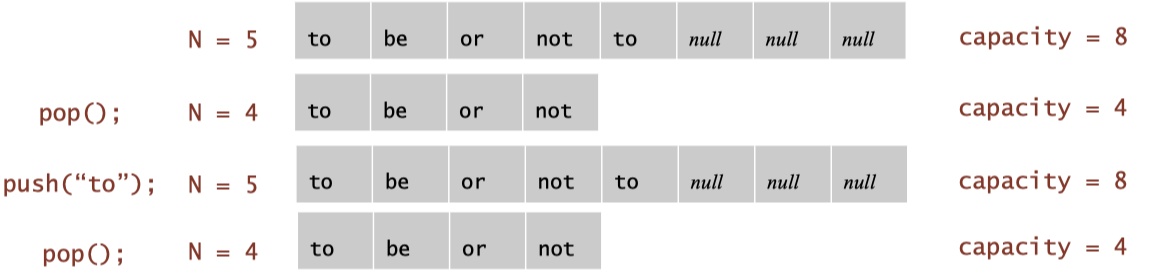
Solution: To avoid this problem, it is common practice to set more generous shrinkage conditions, such as shrinking only when the number of elements in the stack is less than 1/4 of the capacity. For example:
We have capacity = 16 and the current number of elements is \(N = 9\). Since \(9 > 16 / 4 = 4\), there is no shrinkage.
Stack (capacity = 16):
[ a, b, c, d, e, f, g, h, i, _, _, _, _, _, _, _ ]
                      ↑
                      top (N = 9)
We call pop() 5 times in sequence to reduce the number of elements on the stack from 9 to 4.
Stack after popping 5 times (capacity = 16):
[ a, b, c, d, _, _, _, _, _, _, _, _, _, _, _, _ ]
                 ↑
                 top (N = 4)
\(N = 4\), which is exactly equal to \(16 / 4 = 4\), still no shrinkage (only “less than” 1/4 will shrink). So let’s go ahead and pop it once.
Stack after popping once more:
[ a, b, c, _, _, _, _, _, _, _, _, _, _, _, _, _ ]
              ↑
              top (N = 3)
We reduce the capacity from 16 to 8 and copy the existing elements into the new array.
Stack after shrinking to capacity = 8:
[ a, b, c, _, _, _, _, _ ]
           ↑
           top (N = 3)
21 Queue
21.1 Definition of Queue
Queue stores a sequence of elements. It follows the principle of FIFO (First In First Out), which means that the first element to enter the queue is the first to be removed. Queue supports 2 main operations.
enqueue(): Add element to tail/back.dequeue(): Removes and returns the element from the head/front of the queue.
21.2 Deque: Double-Ended Queue
For deque, elements can be inserted or deleted at either end. That means you can
Adds or removes elements from the head/front.
Adds or removes elements from the tail/back.
Deque supports 4 main operations.
addFirst(): Insert from the front.addLast(): Insert from the back.removeFirst(): Delete from the front.removeLast(): Delete from the back.
21.3 Priority Queue
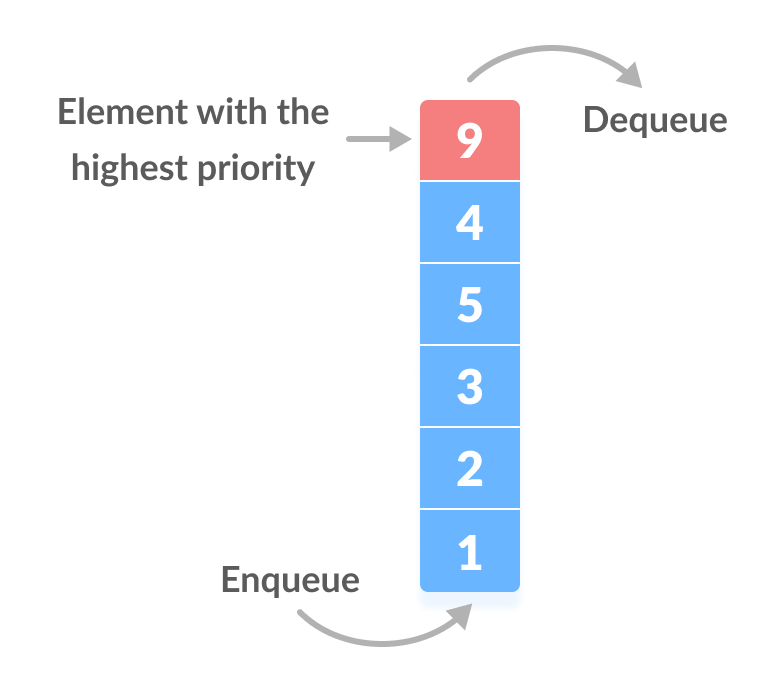
Similar to a normal queue, but each element has a priority value. It’s not FIFO, it’s whoever has the highest priority gets out of the queue first. It’s like a hospital emergency room, where patients are prioritized not in order of arrival, but by the severity of their condition. There are two implementations of priority queue.
Ordered Array
Insertions are kept in order (e.g., big-to-small sorting).
The insertion operation has to find the right position (it may have to move a lot of elements).
Very fast when removing elements (just remove the first one).
Ideal for scenarios where there are frequent queue outs and fewer queue in.
Insertion Operation Time Complexity: \(O(n)\)
Deletion Operation Time Complexity: \(O(1)\)
Unordered Array
Inserts are added directly to the end, regardless of order.
Deletion scans the entire array for the highest priority element.
Ideal for scenarios with frequent entries and fewer exits.
Insertion Operation Time Complexity: \(O(1)\)
Deletion Operation Time Complexity: \(O(n)\)
22 Linked List
22.1 Why Do We Need Linked List?
For a traditional array, how difficult/fast are these operations?
| Unordered array | Ordered array | |
|---|---|---|
| insert | fast (just put at end) | slow (need where) |
| delete | slow (need to shift) | slow (need to shift) |
| search | slow (linear search) | fast (binary search) |
| resize | difficult! | difficult! |
Is it possible to have a data structure with fast insert, delete, and search & easy resizing? Yes, the solution is linked list.
22.2 Definition of Linked List
A Linked List is a linear data structure consisting of a series of nodes, each containing:
Data/item
Pointer/next: Points to the location of the next node in memory.
These nodes are “linked” together by pointers to form a “list”.
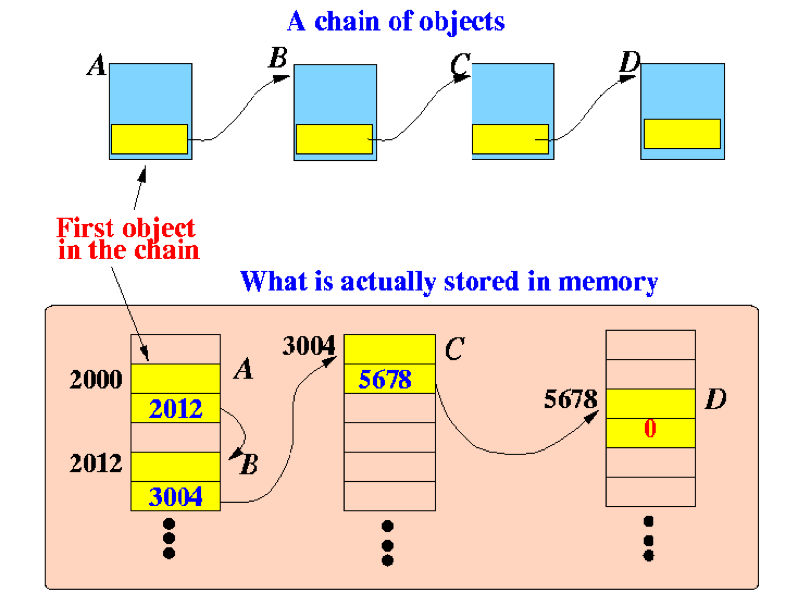
A Linked List is essentially a set of node objects linked together.
public class Node {
    String item;   // Stored data
    Node next;     // Reference to the next node
}
Each node is a Java object (node instance). item is the data it keeps for itself (e.g. “apple”, “banana”, etc.). next is a reference to the next node (object address). We “link” multiple node instances together to form a Linked List. For example, the following linked list:
head → [ "A" | ] → [ "B" | ] → [ "C" | null ]in Java it’s actually:
Node a = new Node();
a.item = "A";

Node b = new Node();
b.item = "B";
a.next = b;   // A → B

Node c = new Node();
c.item = "C";
b.next = c;   // B → C

c.next = null; // C is the last node.
Array vs. Linked List:
| Array | Linked List |
|---|---|
| Store elements contiguously in memory | Not stored contiguously in memory |
| Fixed size | Dynamic size |
| Supports direct index access | No indexed access |
| Some memory overhead to store references |
22.3 Linked List Operations
public class SimpleLinkedList {

    // Define the node class for the linked list
    static class Node {
        String item;
        Node next;

        Node(String item) {
            this.item = item;
            this.next = null;
        }
    }

    // Head node of the linked list
    private Node head;

    public SimpleLinkedList() {
        head = null;
    }

    // ===============================
    // 1. Build the list (add elements at the end)
    // ===============================
    public void buildList(String[] items) {
        for (String item : items) {
            insertAtEnd(item);
        }
    }

    // ===============================
    // 2. Traverse the list
    // ===============================
    public void traverse() {
        Node current = head;
        System.out.print("List: ");
        while (current != null) {
            System.out.print(current.item + " → ");
            current = current.next;
        }
        System.out.println("null");
    }

    // ===============================
    // 3. Search for a given item (returns true/false)
    // ===============================
    public boolean search(String key) {
        Node current = head;
        while (current != null) {
            if (current.item.equals(key)) {
                return true;
            }
            current = current.next;
        }
        return false;
    }

    // ===============================
    // 4. Insert an element (at the beginning)
    // ===============================
    public void insertAtBeginning(String item) {
        Node newNode = new Node(item);
        newNode.next = head;
        head = newNode;
    }

    // Insert an element (at the end)
    public void insertAtEnd(String item) {
        Node newNode = new Node(item);
        if (head == null) {
            head = newNode;
            return;
        }
        Node current = head;
        while (current.next != null) {
            current = current.next;
        }
        current.next = newNode;
    }

    // ===============================
    // 5. Delete an element (from the beginning)
    // ===============================
    public void deleteFromBeginning() {
        if (head != null) {
            head = head.next;
        }
    }

    // Delete an element (from the end)
    public void deleteFromEnd() {
        if (head == null || head.next == null) {
            head = null;
            return;
        }
        Node current = head;
        while (current.next.next != null) {
            current = current.next;
        }
        current.next = null;
    }

    // Delete a node by value (key)
    public void deleteByKey(String key) {
        if (head == null) return;

        // If the node to be deleted is the head
        if (head.item.equals(key)) {
            head = head.next;
            return;
        }

        Node current = head;
        while (current.next != null && !current.next.item.equals(key)) {
            current = current.next;
        }

        // If the target node is found
        if (current.next != null) {
            current.next = current.next.next;
        }
    }

    // ========== Main method for testing ==========
    public static void main(String[] args) {
        SimpleLinkedList list = new SimpleLinkedList();

        // Build a list from array
        list.buildList(new String[]{"A", "B", "C"});
        list.traverse();  // A → B → C → null

        // Insert test
        list.insertAtBeginning("START");
        list.insertAtEnd("END");
        list.traverse();  // START → A → B → C → END → null

        // Search test
        System.out.println("Search B: " + list.search("B"));  // true
        System.out.println("Search Z: " + list.search("Z"));  // false

        // Deletion tests
        list.deleteFromBeginning();  // Delete START
        list.traverse();

        list.deleteFromEnd();        // Delete END
        list.traverse();

        list.deleteByKey("B");       // Delete B
        list.traverse();
    }
}
22.4 Types of Linked Lists
22.4.1 Double-Ended (Singly) Linked List
Also keep a reference to the last element of the list.
What happens when the list is empty? first = last = null
What happens when there is one element? first = last = that one element
22.4.2 Doubly Linked List
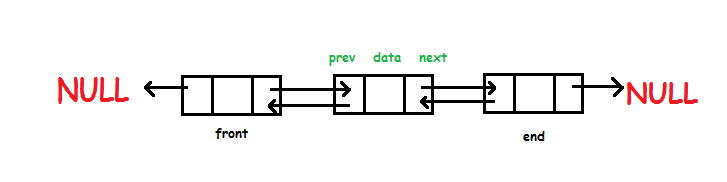
Every node has a next pointer and a previous pointer.
22.4.3 Circular Linked List
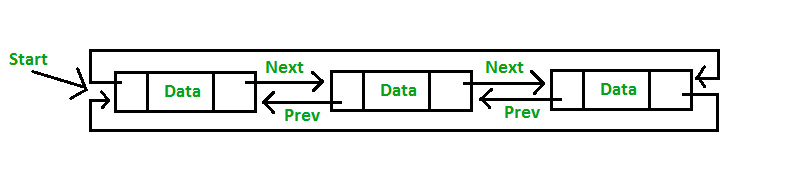
Instead of the last node’s next field being null, point back to the first node.
22.5 Stacks Linked List Implementation
Implementation: using a unidirectional linked list to build a stack.
22.5.1 Defining Linked List
private Node first = null;first is the head of the chain and the top of the stack.
private class Node {
    Item item;
    Node next;
}
Each node contains a data item and a pointer to the next node next.
22.5.2 push(Item item): Adding Element to Top of Stack
public void push(Item item) {
    Node oldfirst = first;
    first = new Node();
    first.item = item;
    first.next = oldfirst;
}
We create a new node and place it at the head of the linked list. What was the top of the stack becomes the .next of the new node.
22.5.3 pop(): Removing Element from Top of Stack
public Item pop() {
    Item item = first.item;
    first = first.next;
    return item;
}
Take out the contents of the header node directly, and then have first point to the next node. The original first node is “dropped”.
22.6 Queues Linked List Implementation
Implementation: using a double-ended singly linked list to build a queue.
22.6.1 Defining Linked List
private Node<Item> first, last;first points to the front - the place where you want to get out of the queue. last points to the back - place to enter the queue. This is in line with the FIFO (First-In-First-Out) queuing feature.
22.6.2 enqueue(Item item): Getting in the Queue (Adding at the End)
public void enqueue(Item item) {
    Node oldlast = last;
    last = new Node();          // Creating a new node
    last.item = item;
    last.next = null;

    if (isEmpty())
        first = last;
        // The queue is empty and the new node is both head and tail
    else
        oldlast.next = last;
        // Attach the new node to the original tail node
}
22.6.3 dequeue(): Out of Queue (Head Removed)
public Item dequeue() {
    Item item = first.item;
    first = first.next;
    // Moving the head pointer forward
    if (isEmpty())
        last = null;
        // If the queue becomes empty, clear the tail pointer.
    return item;
}
Part V Algorithms and Sorting
23 Algorithm Analysis
23.1 What Is A Good Algorithm?
There are two criteria for the answer:
Low Running Time: This means that the algorithm executes fast. We usually measure this by Time Complexity (Big-O representation).
Efficient Usage of Space (Memory): Use as little extra space as possible to minimize memory footprint (Space Complexity).
23.2 Loop Analysis
Most operations in a program are done by loops to iterate through the input data. Loops are often a major determinant of runtime, especially when you are dealing with large amounts of data (e.g. arrays, lists, etc.).
23.2.1 Total Cost
How to Calculate the Time Complexity (Total Cost) of A Loop?
Count how many statements there are in the loop body (usually assignments, additions, function calls, etc.).
Analyze how many times the loop is executed (usually related to \(n\), \(n^2\), etc.).
Multiply the two: \[\text{Number of Statements} \times \text{Number of Executions} =\text{Total Cost}\]
Example 1:
double sum = 0.0;
for (int i = 0; i < n; i++) {
    sum += array[i];
}
In this example, \[\text{Number of Statements} \times \text{Number of Executions} = 1 \times n = n = \text{Total Cost}\] Example 2:
for (int i = 0; i < n; i++) {
    for (int j = 0; j < n; j++) {
        System.out.println(i + ", " + j);
    }
}
In this example, \[\text{Number of Statements} \times \text{Number of Executions} = 1 \times n \times n = n^2 = \text{Total Cost}\] If we encounter nested loops, we use the number of outer loops multiplied by the number of inner loops to equal the total number of executions.
Example 3:
for (int i = 0; i < n; i++) {
    for (int j = 0; j < i; j++) {
        System.out.println(i + ", " + j);
    }
}
In this example, the number of statements is 1 and the number of executions of the inner loop grows with \(i\).
When \(i = 0\) and \(j < 0\), it is executed \(0\) times.
When \(i = 1\) and \(j < 1\), it is executed \(1\) times.
When \(i = 2\) and \(j < 2\), it is executed \(2\) times.
...
When \(i = n-1\) and \(j < n-1\), it is executed \(n-1\) times.
So the total number of executions is: \[0 + 1 + 2 + ... + (n-1) = n(n-1)/2\] In the end, the total cost is: \[\text{Total Cost} = 1 \times [0 + 1 + 2 + ... + (n-1)] = n(n-1)/2\] Example 4:
for (int i = 0; i < n; i++) {
    for (int j = i; j < n; j++) {
        System.out.println(i + ", " + j);
    }
}
In this example, the number of statements is 1 and the number of inner loop executions depends on \(i\).
When \(i = 0\): \(j\) goes from \(0\) to \(n-1\); it execute \(n\) times.
When \(i = 1\): \(j\) goes from \(1\) to \(n-1\); it execute \(n-1\) times.
...
When \(i = n-1\): \(j\) goes from \(n-1\) to \(n-1\); it execute \(1\) times.
So the total number of executions is: \[n + (n-1) + (n-2) + ... + 1 = n(n+1)/2\] In the end, the total cost is: \[\text{Total Cost} = 1 \times (n(n+1)/2) = n(n+1)/2\]
23.2.2 Big O Representation
Method 1:
Derive the cost function \(f(n)\) of your algorithm. Example: \(3n^2 + 5n + 10\).
Throw away lower-order terms [tilde notation]. Example: \(~3n^2\).
Drop constant factors [Big-Oh notation]. Example: \(O(n^2)\).
Method 2: Use the mnemonic.
Each loop has a corresponding update expression. For example, for the following loop, the update expression is i++.
double sum = 0.0;
for (int i = 0; i < n; i++) {
    sum += array[i];
}
We can derive big O by using the following mnemonic in combination with the update expression.
For a single-level loop, it is \(O(n)\) if the update expression is addition or subtraction, and \(O(logn)\) if the update expression is multiplication or division.
For nested loops, if the inner loop depends on the outer loop.
The outer loop is additive and subtractive, and the inner loop is also additive and subtractive, with a time complexity of \(O(n^2)\).
The outer loop is multiplication and division and the inner loop is addition and subtraction with \(O(n)\) time complexity.
The outer loop is addition and subtraction and the inner loop is multiplication and division with a time complexity of \(O(n logn)\).
The outer loop is multiplication and division and the inner loop is also multiplication and division with a time complexity of \(O((log n)^2)\).
In summery, in most cases, the time complexity of a nested loop is equal to the product of the time complexities of the inner and outer loops, except when the inner loop’s bound depends on the outer loop and the outer loop grows multiplicatively (e.g.,
i *= 2) while the inner loop grows additively (e.g.,j++).
For nested loop, if inner loop does not depend on outer loop, we directly multiply inner time complexity by outer time complexity to equal the overall time complexity.
If two loops are sequential (i.e., not nested), the total time complexity is the maximum of the two. \(O(n) > O((\log n)^2) > O(\log n)\).
Example 1:
double sum = 0.0;
for (int i = 0; i < n; i++) {
    sum += array[i];
}
It is single-level loop; update expression is plus; time complexity is \(O(n)\).
Example 2:
for (int i = 0; i < n; i++) {
    for (int j = i; j < n; j++) {
        System.out.println(i + ", " + j);
    }
}
It is nested loop; update expression is plus for inner and outer loop; time complexity is \(O(n^2)\).
24 Simple Sorting
24.1 Bubble Sort
24.1.1 Algorithm
The essence of bubble sort is to push large elements backward through multiple rounds of swapping.
We traverse the entire list of data one at a time.
If two neighboring elements are found in the wrong order (e.g., the former is larger than the latter), swap them.
In each round, the current largest element “bubbles up” to the end.
The next round simply traverses up to just before the last position of the previous round, as it is already lined up.
Repeat this process until all elements are ordered.
Here is the code of bubble sort.
void bubbleSort(int arr[])
{
    int n = arr.length;
    for (int i = 0; i < n-1; i++)
        for (int j = 0; j < n-i-1; j++)
            if (arr[j] > arr[j+1])
            {
                // swap temp and arr[i]
                int temp = arr[j];
                arr[j] = arr[j+1];
                arr[j+1] = temp;
            }
}
24.1.2 Example of Bubble Sort
The original array is 51428.
Round 1: 14258.
First of all, the algorithm compare the first two element and swaps since \(5>1\). \[(5,1,4,2,8)---(1,5,4,2,8)\]
Since \(5>4\), we swap 5 and 4. \[(1,5,4,2,8)---(1,4,5,2,8)\]
Since \(5>2\), we swap 5 and 2. \[(1,4,5,2,8)---(1,4,2,5,8)\]
Round 2: 12458.
First of all, the algorithm compare the first two element and do not swap. Then, the algorithm compare 4 and 2. The algorithm swap 4 and 2 since \(4>2\). \[(1,4,2,5,8)---(1,2,4,5,8)\]
Now, the array is already sorted, but our algorithm does not know if it is completed. The algorithm needs one whole pass without any swap to know it is sorted.
Round 3: 12458.
24.2 Selection Sort
24.2.1 Algorithm
The essence of selection sort is to keep swapping the smallest element with the first of the parts that are not yet sorted.
Scan from left to right, keeping the int i as the integer of the smallest item you’ve seen so far.
After the scan, move the element at i to the left-most position.
Repeat, starting from the second element this time.
Then the third element…
Here is the code of selection sort.
public static void sort(Comparable[] a) {
    int N = a.length;
    for (int i = 0; i < N; i++) {
        int min = i;
        for (int j = i+1; j < N; j++)
            if (less(a[j], a[min]))
                min = j;  // update minimum index
        exch(a, i, min);
    }
}
24.2.2 Example of Selection Sort
The original array is 51428.
Round 1: 15428.
The smallest is 1. We swap 1 and the first of the array (5).
Round 2: 12458
The smallest is 2. We swap 2 and the first of the unsorted part of the array (5).
24.3 Insertion Sort
24.3.1 Algorithm
The essence of insertion sort is to keep shifting a number forward until it gets to the right place.
Partition the elements into two regions.
Assume the left side is partially sorted. Elements on the left side are in a sorted order, but not necessarily in their final positions.
For each remaining element on the right side, insert the element where it belongs on the left side.
Repeat until done…
Here is the code of insertion sort.
public static void sort(Comparable[] a) {
    int N = a.length;
    for (int i = 0; i < N; i++)
        for (int j = i; j > 0; j--)
            if (less(a[j], a[j-1]))
                exch(a, j, j-1);
            else break;
}
24.3.2 Example of Insertion Sort
The original array is 51428.
Round 1: \([5 | 1 4 2 8]\) (no swaps)
Round 2: \([1 5 | 4 2 8]\) (1 swap)
Round 3: \([1 4 5 | 2 8]\) (1 swap)
Round 4: \([1 2 4 5 | 8]\) (2 swaps)
Round 5: \([1 2 4 5 8]\) (no swaps)
25 Merge Sort and Quick Sort
25.1 Algorithm of Merge Sort
Merge Sort splits an array in two, recursively sorts the left and right parts, and then merges them into a single ordered array. It is essentially the logic of divide and conquer.
Divide the list into two halves
Sort each half
Merge each half in sorted order
25.2 Example of Merge Sort
The original array is \([38,27,43,3,9,82,10]\).
Stage 1 Split Phase: Keep “halving” the array until there is only one element left in each subarray (individual elements are naturally ordered).
1st layer split: split into left and right halves. \[[38,27,43,3] \text{and} [9,82,10]\]
2nd layer split: continue to divide. \[[38,27], [43,3], [9,82], [10]\]
3rd layer split: final split into individual elements. \[[38],[27],[43],[3],[9],[82],[10]\]
Stage 2 Merge Phase: Starting at the bottom, two by two, they are merged into ordered subarrays until they are finally merged into a complete ordered array.
1st layer merge: \[[27,38], [3,43], [9,82], [10]\]
2nd layer merge: \[[3,27,38,43], [9,10,82]\]
3rd layer merge: \[[3,9,10,27,38,43,82]\]
25.3 Some Facts about Merge Sort
Algorithm Type: Divide and Conquer
Recursive or Not: This is recursive (keep splitting the array + merging).
Whether to Sort In-place: No, additional memory space (auxiliary array) is required.
Average Time Complexity: \(O(n logn)\)
Best Case Time Complexity: \(O(n logn)\)
Worst Case Time Complexity: \(O(n logn)\)
25.4 Algorithm of Quick Sort
Quick Sort selects a pivot, then puts the one smaller than the pivot on the left side of the pivot, and the one larger than the pivot on the right side of the pivot, with constant recursion, to complete the sort. It is essentially the logic of divide and conquer.
Shuffle the array: avoiding arrays that are already ordered or reverse-ordered.
Partition so that for some j:
entry a[j] is in place.
no larger entry to the left of j.
no smaller entry to the right of j.
Recursively sort.
25.5 Example of Quick Sort
The original array is \([38,27,43,3,9,82,10]\).
Stage 1: Overall sorting and pivot is 10. We put anything less than or equal to 10 on the left and anything greater than on the right. \[[3,9,10,38,27,82,43]\]
Stage 2: Quick sort the left \([3,9]\) and pivot is 9. Remain unchanged. \[[3,9]\]
Stage 3: Quick sort the right \([38,27,82,43]\) and pivot is 43. \[[38,27,43,82]\]
Stage 4: Quick sort the left \([38,27]\) and pivot is 27. \[[27,38]\]
Stage 5: Combine all the subarray and the pivots. \[[3,9,10,27,38,43,82]\]
25.6 Some Facts about Quick Sort
Algorithm Type: Divide and Conquer
Recursive or Not: This is recursive (sorting subarrays by recursion).
Whether to Sort In-place: Yes, no additional arrays are needed (except for the recursive stack).
Average Time Complexity: \(O(n logn)\)
Best Case Time Complexity: \(O(n logn)\)
Worst Case Time Complexity: \(O(n^2)\) when pivot is extremely unbalanced (e.g. array is sorted + first pivot is selected).
Suitability for Big Data Sorting: Usually very fast, faster than mergesort in practice.
How to avoid the Worst Case Scenario: Using randomized pivot to shuffle the array.
26 Sorting Code Explanation and Time Complexity
26.1 Simple Sort Code
public class SortingAlgorithms {

    // Bubble Sort
    public static void bubbleSort(int[] arr) {
        for (int i = 0; i < arr.length - 1; i++) {
            for (int j = 0; j < arr.length - 1 - i; j++) {
                if (arr[j] > arr[j + 1]) {
                    int temp = arr[j];
                    arr[j] = arr[j + 1];
                    arr[j + 1] = temp;
                }
            }
        }
    }

    // Selection Sort
    public static void selectionSort(int[] arr) {
        for (int i = 0; i < arr.length - 1; i++) {
            int minIndex = i;
            for (int j = i + 1; j < arr.length; j++) {
                if (arr[j] < arr[minIndex]) {
                    minIndex = j;
                }
            }
            int temp = arr[i];
            arr[i] = arr[minIndex];
            arr[minIndex] = temp;
        }
    }

    // Insertion Sort
    public static void insertionSort(int[] arr) {
        for (int i = 1; i < arr.length; i++) {
            int key = arr[i];
            int j = i - 1;
            while (j >= 0 && arr[j] > key) {
                arr[j + 1] = arr[j];
                j--;
            }
            arr[j + 1] = key;
        }
    }
}
26.2 Merge Sort Code
public class MergeSort {

    // Main function: the entry point of the program, used to demonstrate
    // the Merge Sort effect.
    public static void main(String[] args) {
        // Create an integer array (to be sorted)
        Integer[] array = {9, 3, 7, 1, 6, 8, 2, 5, 4};

        // Print the array before sorting.
        System.out.println("Before sorting:");
        printArray(array);

        // Call the mergesort method to sort the array.
        mergesort(array);

        // Print the sorted array.
        System.out.println("After sorting:");
        printArray(array);
    }

    // Public entry method for Merge Sort
    public static void mergesort(Comparable[] a) {
        // Create an auxiliary array of the same size as the original
        // array for temporary data storage during merging
        Comparable[] aux = new Comparable[a.length];

        // Call the recursive sort method to start sorting the entire
        // array.
        sort(a, aux, 0, a.length - 1);
    }

    /**
     * Recursive sort function: sorting the interval a[lo..hi]
     *
     * @param a   original array
     * @param aux auxiliary arrays for storing data during merge operations
     * @param lo  starting index of the current subarray
     * @param hi  ending index of the current subarray
     */
    private static void sort(Comparable[] a, Comparable[] aux, int lo, int hi) {
        // When the subarray contains only one element or is empty, it is
        // returned directly (base case)
        if (hi <= lo) return;

        // Calculate the middle position for splitting the array
        int mid = lo + (hi - lo) / 2;

        // Recursive sort on the left half a[lo..mid]
        sort(a, aux, lo, mid);

        // Recursive sort on right half a[mid+1..hi]
        sort(a, aux, mid + 1, hi);

        // Merge left and right parts (a[lo..mid] with a[mid+1..hi])
        merge(a, aux, lo, mid, hi);
    }

    /**
     * Merge two sorted subarrays a[lo..mid] and a[mid+1..hi].
     */
    private static void merge(Comparable[] a, Comparable[] aux, int lo,
    int mid, int hi) {
        // Step 1: Copy all elements of a[lo..hi] into the auxiliary array
        // aux
        for (int k = lo; k <= hi; k++) {
            aux[k] = a[k];
        }

        // i points to the starting position of the left half, j points to
        // the starting position of the right half
        int i = lo, j = mid + 1;

        // Step 2: Perform a merge, placing the smaller elements in order
        // into the original array a
        for (int k = lo; k <= hi; k++) {
            if (i > mid) {
                // If the left half is exhausted, take the right half of
                // the element directly
                a[k] = aux[j++];
            } else if (j > hi) {
                // If the right half is exhausted, take the left half of
                // the element directly
                a[k] = aux[i++];
            } else if (less(aux[j], aux[i])) {
                // If the right element is smaller, then take the right
                // element and put it into a[k]
                a[k] = aux[j++];
            } else {
                // Otherwise take the left element and put it into a[k]
                a[k] = aux[i++];
            }
        }
    }
}
26.3 Quick Sort Code
// Quick Sort implementation in basic Java
public class QuickSort {

    // Main method to demonstrate quick sort
    public static void main(String[] args) {
        int[] array = {9, 3, 7, 1, 6, 8, 2, 5, 4};

        System.out.println("Before sorting:");
        printArray(array);

        quickSort(array, 0, array.length - 1);

        System.out.println("After sorting:");
        printArray(array);
    }

    // Quick Sort function
    public static void quickSort(int[] arr, int low, int high) {
        if (low < high) {
            int pivotIndex = partition(arr, low, high);
            quickSort(arr, low, pivotIndex - 1);  // Sort left part
            quickSort(arr, pivotIndex + 1, high); // Sort right part
        }
    }

    // Partition the array and return pivot index
    private static int partition(int[] arr, int low, int high) {
        int pivot = arr[high]; // Choose the last element as pivot
        int i = low - 1;       // Index of smaller element

        for (int j = low; j < high; j++) {
            if (arr[j] <= pivot) {
                i++;
                swap(arr, i, j); // Swap if element is <= pivot
            }
        }

        swap(arr, i + 1, high); // Move pivot to correct position
        return i + 1;
    }

    // Swap two elements in array
    private static void swap(int[] arr, int i, int j) {
        int temp = arr[i];
        arr[i] = arr[j];
        arr[j] = temp;
    }

    // Utility function to print array
    private static void printArray(int[] arr) {
        for (int num : arr) {
            System.out.print(num + " ");
        }
        System.out.println();
    }
}
26.4 Time Complexity of Sorting Method
| Sorting Method | Best Case | Average Case | Worst Case |
|---|---|---|---|
| Bubble Sort | \(O(n)\) | \(O(n^2)\) | \(O(n^2)\) |
| Selection Sort | \(O(n^2)\) | \(O(n^2)\) | \(O(n^2)\) |
| Insertion Sort | \(O(n)\) | \(O(n^2)\) | \(O(n^2)\) |
| Merge Sort | \(O(n \log n)\) | \(O(n \log n)\) | \(O(n \log n)\) |
| – divide (compute mid) | \(O(1)\) per level | \(O(1)\) per level | \(O(1)\) per level |
| – sort (recursive calls) | \(\log n\) levels | \(\log n\) levels | \(\log n\) levels |
| – merge step | \(O(n)\) per level | \(O(n)\) per level | \(O(n)\) per level |
| Quick Sort | \(O(n \log n)\) | \(O(n \log n)\) | \(O(n^2)\) |
| – partition | \(O(n)\) | \(O(n)\) | \(O(n)\) |
| – sort (recursive calls) | \(\log n\) levels | \(\log n\) levels | \(n\) levels (degenerate) |